Note: This is part five of six in our BLE throughput series. See all six articles here.
BLE throughput problems tend to fall into two categories. The first is stack configuration or PHY selection, DLE, ATT MTU, and connection parameters. The second is harder to spot because it lives in your code: which ATT operations you’re using to send data, and how well you’re keeping the transmit pipeline fed.
Developers often work through the configuration layer carefully and still hit a ceiling they can’t explain. The stack is set up correctly. The parameters look right. But throughput isn’t where it should be. More often than not the problem is here: in implementation decisions that the stack has no way to compensate for on its own.
This article covers both places where application-level decisions quietly limit throughput, and what to do about them.
Note: If you haven’t worked through the stack configuration layer yet, start with our articles on PHY selection, DLE, ATT MTU, and message sizing, and connection parameters before continuing here.
ATT Operations and Throughput
The ATT operation you choose to send data has a bigger impact on throughput than most developers expect. The difference between the right choice and the wrong one isn’t marginal. It can limit you to a single message per connection event regardless of how everything else is configured.
Selecting the Best ATT Operation
BLE transfers application data through ATT operations performed by the GATT Client and GATT Server.
When sending application data from the GATT Client (typically the Central) to the GATT Server (typically the Peripheral), the most common ATT operation is either the Write Request (also called “Write with Response” on mobile platforms) or the Write Command (“Write without Response”).
The Write Request requires the GATT Server to send a subsequent Write Response, which serves as an ATT layer acknowledgment of the Write Request. In contrast, the Write Command requires no ATT layer response from the GATT Server. However, note that the Link Layer does provide guaranteed delivery for all messages.
When sending application data from the GATT Server to the GATT client, the most common ATT operation is either the Indication or Notification. The Indication is equivalent to the Write Request except in the opposite direction. The GATT Client acknowledges the Indication by sending a Confirmation in response. The Notification is equivalent to the Write Command except in the opposite direction.
For throughput, always choose the Write Command and Notification. These operations are asynchronous, meaning they can be sent back-to-back without waiting for feedback at the ATT layer. This means multiple ATT messages can be sent in a single connection event, allowing maximum usage of the connection event to transmit application data.
Note: All of the diagrams in this post have used Write Commands and Notifications.

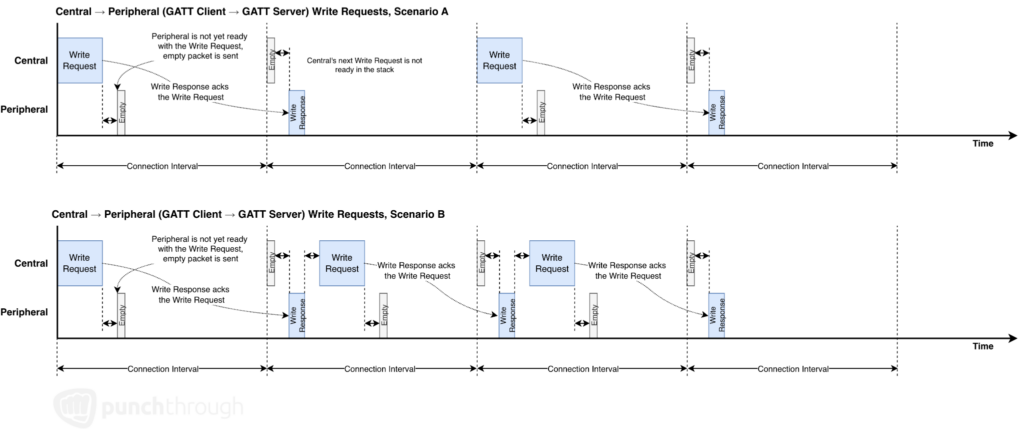
In contrast, the Write Request and Indication are synchronous, requiring an ATT response before the next message can be sent. Because the interframe spacing is only 150us between packets, this typically isn’t long enough for the receiver to parse the packets up to the ATT layer, create the response, and send it before the next packet is scheduled in the same Connection Event. As a result:
- The Write Request or Indication is sent in one Connection Event
- The Write Response or Confirmation is sent in the next Connection Event
- The next Write Request or Indication can only be sent in the Connection Event after that
This means throughput is limited to a maximum of a single ATT operation every 1 or 2 connection events.

There are other ATT operations in addition to the Write Request, Write Command, Indication, and Notification, but they don’t provide any throughput benefit, nor are they always applicable to an application use case.
What About Read Operations?
The ATT layer also offers Read Requests and Read Responses. A GATT Client sends a Read Request. The GATT Server sends a Read Response back containing the data to be read. This synchronous operation is inherently slower because it is synchronous, very similar to Write Requests. It also adds extra overhead.
If your application needs synchronous communication, it may still be better to send a Write Command to request data, and then send the response in one or more Notifications. There is more ability to customize and dynamically change the response in the Notification.
Managing Your Transmit Pipeline
Choosing the right ATT operation gets data moving efficiently. Keeping the pipeline fed is what keeps it moving. Even with everything else configured correctly, if the stack runs out of queued data before a connection event ends that air time is gone.
Keep the Transmit & Receive Pipelines Flowing
Almost every BT stack supports queueing of outgoing Write Commands or Notifications. Use this. It is critical to keep providing the outgoing data to the stack before the previous data is sent. Otherwise, the stack might miss a deadline on the current connection event, leading to waiting until the next connection event to send the data.
This may mean using an independent thread or callbacks to keep providing data to the transmit queue while the rest of the application may be busy.
Note: This guidance applies to Android only. On iOS, the OS queue behaves predictably and can be used as expected. On Android, transmit queue depth has historically varied by manufacturer. We have observed undocumented queue depths of 1 with no feedback if the queue is overwritten. For Android, avoid relying on the OS to queue BLE writes.
Minimize Application Overhead
In the same way that the highest throughput is achieved by the BLE stack in part by minimizing overhead from the stack, minimize overhead in your application. If high throughput is required, consider how to minimize application message headers.
Sending Large Payloads
Our article on DLE, ATT MTU, and Message Sizing demonstrates ideal ATT message sizes of 244 or 495 bytes. These message size targets assume your application is already breaking data into appropriately sized chunks. If you’re working with larger payloads like firmware updates, continuous sensor streams, or file transfers, that segmentation has to happen in your code.
Exceeding the ATT Message Size
So far, we’ve only allowed the application data to be 512 bytes or less, ideally 244 or 495 bytes. What does this mean if you have many kilobytes of data to send over the air? There is a concept of Queued Writes by using the Prepare Write Request and Execute Write, but these are synchronous similar to Write Requests. These ATT operations will not provide maximum throughput.
Instead, sending large payloads is best managed at the application layer by segmenting large payloads into 244 or 495 byte segments and then reassembling them on the receiving side. There are many ways to approach this and you can learn more in our article on our article on DLE, ATT MTU, and Message Sizing. But a common approach is by adding a small custom header containing a segment ID and count prepended to each application segment.
Where to Go From Here
If you’ve worked through the full configuration stack, you have a complete picture of BLE throughput optimization from the physical layer all the way up to your code. The numbers that seemed out of reach at the start – 178 kB/s device-to-device, around 90 kB/s with a mobile device on one end – are the product of all of these decisions working together.
If you’re still working through the stack, these articles cover each layer: