Note: This is part three of six in our BLE throughput series. See all six articles here.
Switching to 2M PHY tends to feel like the move that should unlock throughput. And it is a meaningful gain, but if you’ve made that switch and your numbers still aren’t where you expected, the PHY mode wasn’t the problem. The gap between where you are and where the ceiling may come down to three settings that sit above the physical layer: Data Length Extension, ATT MTU, and message sizing.
The reason these are easy to misconfigure isn’t that they’re complicated individually — each one has an ideal value. The reason is that they have to be set in coordination with each other. Enabling DLE without adjusting ATT MTU leaves DLE doing nothing. Getting both of those right but sending the wrong payload size introduces fragmentation overhead that quietly eats into your throughput. The gains aren’t in any one setting. They’re in the alignment between all three.
This article walks through each one, what it controls, and the specific values to target so you can find where your configuration is leaving performance on the table.
Data Length Extension
Of the three settings, Data Length Extension (DLE) has the highest ceiling impact and the most downstream consequences. Getting it right is what makes the rest of the configuration work meaningful.
Maximizing Over-the-Air Packet Length with DLE
DLE was added to Bluetooth in v4.2. Before DLE, the maximum payload length of a Link Layer packet was 27 bytes.
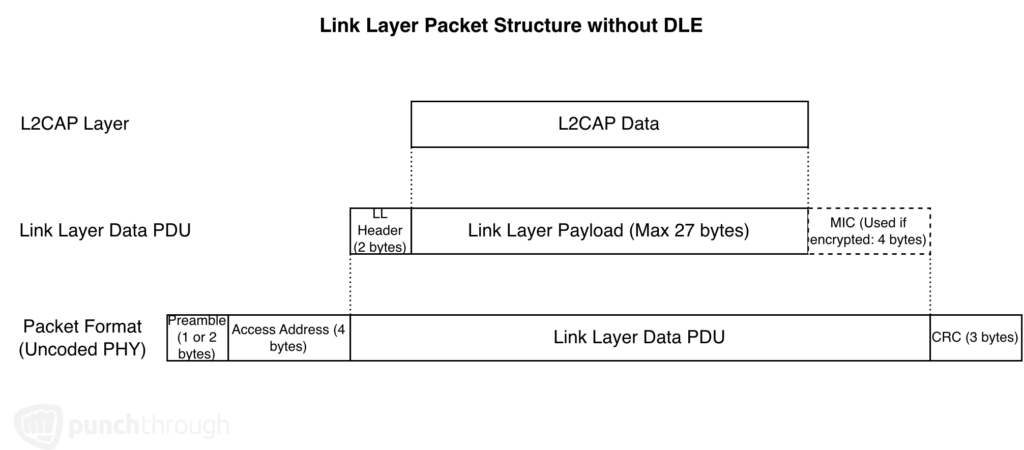
DLE increased that maximum to 251 bytes.
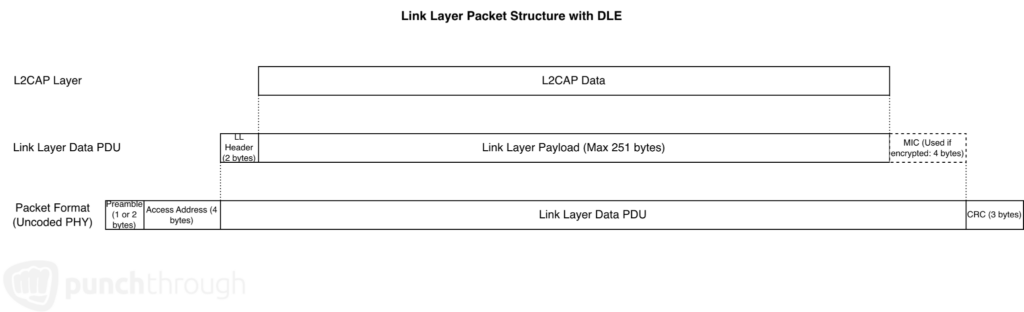
Using 251-byte payloads maximizes air time and minimizes overhead. Even though DLE increases payload size by roughly 10x, you won’t see a 10x improvement in throughput. Instead, throughput increases by about 3.5x, due to the overhead of packet headers and footers, interframe spacing, and packets in the opposite direction.

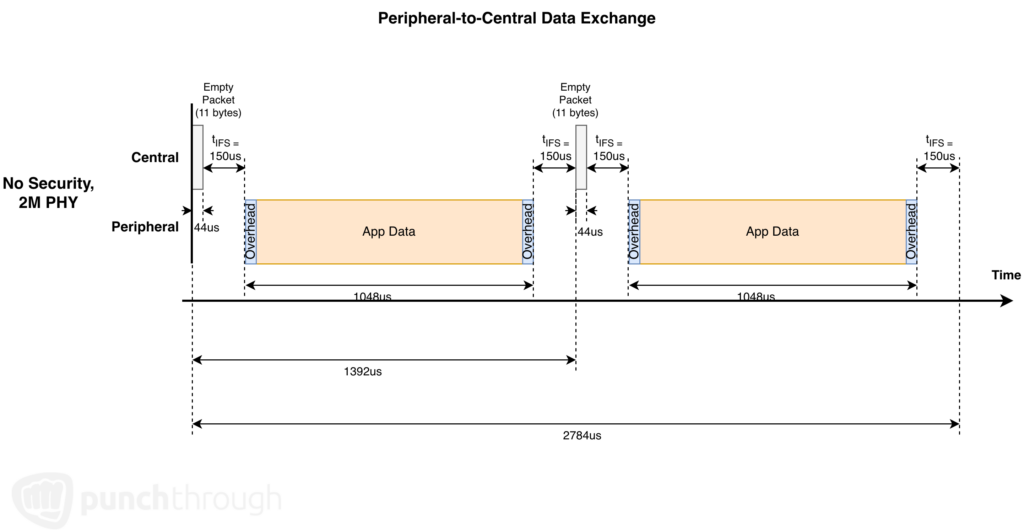
In the example above, without DLE, 27 bytes of Link Layer payload data can be sent every 496us within a Connection Event. With DLE, 251 bytes can be sent every 1392us. Normalized:
- Without DLE: 54.4 kB/s
- With DLE: 180.3 kB/s
That 180 kB/s figure is the theoretical maximum for Link Layer payload data at 2M PHY with no security. We’ll still see some potentially large reductions due to other Link Layer factors and due to L2CAP and ATT overhead.
Note this data rate applies to either direction. If sending data from the Peripheral to the Central, it is the same results:
The terminology around DLE varies. The Bluetooth Core Specification doesn’t use the term “data length extensions” directly. Depending on your BLE stack, you may see it referred to as maxTxOctets and maxRxOctets, or simply “data length.” Most stacks either allow setting this to 251 or set it to 251 by default. There may also be a corresponding option for TX time — the correct value to accommodate the longest Link Layer packet (including all headers) of 265 bytes at 1M PHY with security is 2120us.
When max octet values are set above the minimum of 27, the Central and Peripheral perform an LL_LENGTH_REQ and LL_LENGTH_RSP exchange to negotiate the desired value. This is handled automatically by the BLE stack.
What Happens When the Layers Above Don’t Match
DLE sets the ceiling at the Link Layer, but that ceiling only matters if the layers above it are sized to take advantage of it, and when they aren’t, fragmentation is the result.
The L2CAP layer sits above the Link Layer. The L2CAP PDU consists of a 4 byte header and a payload where a higher layer ATT PDU is placed. The 4 byte header contributes to overhead.

L2CAP’s role in maximizing throughput is narrow, but it does have one critical contribution: L2CAP is responsible for fragmentation and recombination when higher layers request to send data lengths larger than the max data length defined in the Link Layer. The L2CAP PDU is split into fragments for each LL PDU. Upon reception of LL PDUs, these fragments are recombined into a single L2CAP PDU.
This fragmentation process has a direct impact on overhead. Consider a 519-byte L2CAP PDU (which, as shown in the ATT MTU discussion below, is the largest L2CAP PDU length for common ATT operations):
- With DLE disabled (max LL payload: 27 bytes): 20 fragments required
- With DLE enabled (max LL payload: 251 bytes): 3 fragments required

Fewer fragments means fewer packet headers, less interframe spacing overhead, and more of each packet carrying actual application data. This is why DLE is foundational, and why the settings above it in the stack need to be sized to take advantage of it. The next two settings, ATT MTU and message sizing, determine whether your stack ever produces those well-packed packets in the first place.
ATT MTU
DLE sets the capacity at the Link Layer. ATT MTU determines whether the layer above it is actually sized to use that capacity. The two have to move together for maximum throughput, which is why this is the natural next setting to look at if DLE is in place and throughput still isn’t where it should be.
ATT Layer Background
The Attribute layer (ATT) provides the application-facing API to write and read data over BLE. While GATT defines data format and groups data, ATT performs the operations on GATT characteristics.
The ATT header is 3 bytes for the commonly-used ATT operations used by the application.

ATT packets are passed down to the L2CAP layer. The L2CAP layer prepends a 4 byte header to the ATT packet. Then the L2CAP layer sends the L2CAP packet to the Link Layer either as a whole or as fragments if needed. This means every ATT message has 7 bytes of ATT and L2CAP header overhead.
How Your ATT MTU Makes Your DLE Count
The ATT MTU (Maximum Transmission Unit) defines the maximum length of ATT layer data per ATT transaction. The default MTU is often as low as 23 bytes. It can be negotiated up to 527 bytes, though the maximum ATT payload is 512 bytes (one ATT operation carries a 15-byte header, which accounts for the additional bytes in the spec limit).
The relationship between ATT MTU and DLE is direct: if DLE is enabled but ATT MTU is left at 23 bytes, DLE is effectively meaningless. The ATT layer is never sending enough data to fill the Link Layer packets DLE made available. Conversely, if ATT MTU is maximized but DLE is not enabled, a single ATT payload may require 20 Link Layer packets instead of 3.
It’s always best to set the ATT MTU to the highest value your stack supports. Some stacks cap this at 247 bytes rather than 512. As the next section explains, that limitation has less impact on throughput than it might seem, but the principle holds: maximize the MTU and configure it alongside DLE, not in isolation.
Message Sizing
With DLE and ATT MTU set correctly, this is where the overhead math gets precise. The size of the payload you actually send determines whether the stack can pack data into packets efficiently, and the margin for error is smaller than most developers expect.
The 244 and 495 Byte Targets
Despite maximizing ATT MTU, maximum throughput is actually achieved with a 495-byte ATT payload rather than the 512-byte maximum. The ideal ATT payload sizes are either 244 bytes or 495 bytes, and this isn’t arbitrary — it’s a direct consequence of how ATT payloads map to Link Layer packets when DLE is enabled.
244 and 495 are the ATT payload lengths that result in either 1 or 2 fully packed Link Layer packets, respectively. This is derived as follows:
- 244 bytes = 1 Link Layer Packet * 251 bytes (Link Layer Payload bytes per Packet) – 4 bytes (L2CAP header) – 3 bytes (ATT Header)
- 495 bytes = 2 Link Layer Packets * 251 bytes (Link Layer Payload bytes per Packet) – 4 bytes (L2CAP header) – 3 bytes (ATT Header)

If 245 or 496 bytes are sent instead, L2CAP fragmentation will produce fully packed Link Layer packets plus one additional packet containing a single byte of ATT payload data. The BLE stack will not combine multiple ATT payloads to fill that extra packet — it goes out as its own transmission, carrying nearly nothing but overhead.

This results in a lot of Link Layer packet overhead, but also the additional empty packet exchange and interframe spacing. The following timing diagram shows the drastic impact 1 extra byte has on throughput.
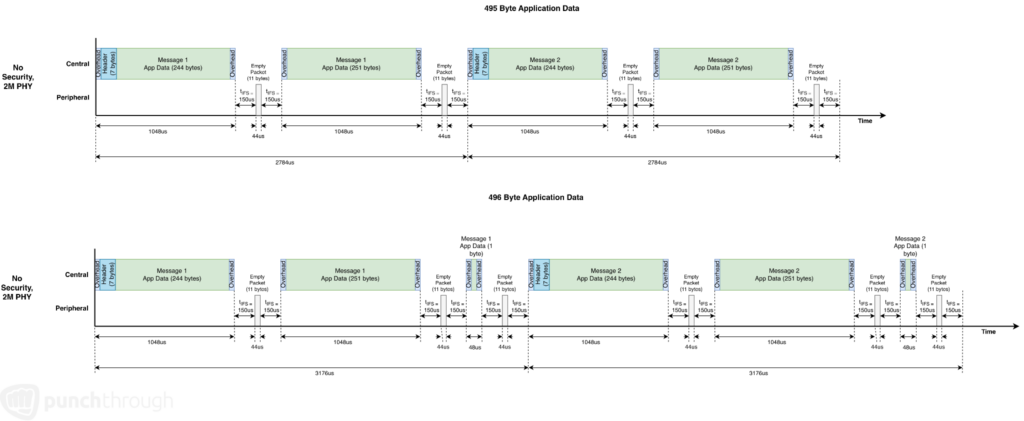
The practical impact of that one extra byte is significant. With 495-byte payloads, throughput of application data reaches a theoretical maximum of 177.8 kB/s. With 496-byte payloads, that drops to 156.2 kB/s. One byte costs roughly 21 kB/s.
Using 495 bytes is marginally better than 244 for throughput, because there are 7 bytes of L2CAP and ATT overhead per 495 bytes of application data compared to 7 bytes of overhead per 244 bytes. The ratio is better.
So What is the Maximum Application Data throughput?
Earlier, we outlined the maximum theoretical Link Layer payload throughput at 180.3 kB/s. To determine the maximum throughput for application data, e.g. the ATT payload data, the L2CAP and ATT header overhead needs to be considered. Without consideration for connection event limitations, this brings maximum throughput to these values at 2M PHY:
- 495 byte payloads: 177.8 kB/s
- 244 byte payloads: 175.3 kB/s
Here is a summary of how fragmentation, DLE, payload sizing, and PHY mode affect throughput. This assumes the same ATT payload size is used in consecutive requests. On mobile platforms, the maximum throughput is closer to half this graph due to limits to Connection Event duration.

Sending More Than 495 Bytes
ATT operations are capped at 512 bytes. For larger payloads, the right approach is to handle segmentation at the application layer: breaking the payload into 244 or 495-byte segments and reassembling them on the receiving side. A common pattern is to prepend a small custom header to each segment containing a segment ID and count. This keeps Link Layer packets optimally packed while giving the application the data continuity it needs.
What About Connection-Oriented Channels?
If you’ve come across Connection-Oriented Channels (COC) in your research, the appeal is straightforward: COC allows sending data directly as L2CAP messages without going through the ATT layer, effectively removing the 3 byte ATT header from every transaction. In practice, that savings works out to roughly 1% improvement in throughput. For most applications, that gain doesn’t justify the implementation complexity and reduced ecosystem support. The ATT and GATT layers are where most stacks, examples, and tooling are built around. But, if you need every byte in throughput optimization, this is a good option to explore.
A Note on The Impact of BLE Security
Using security has a very minor impact on throughput. When using Bluetooth’s built-in security, a 4 byte Message Integrity Check (MIC) is added to the overhead. This increases the packet transmit duration by 16us with 2M PHY. Because empty packets have no Link Layer data to be protected, the MIC is excluded.

This drops the Link Layer payload theoretical maximum throughput from 180.3 kB/s to 178.3 kB/s. When looking at application data (ATT payload) throughput, there are minor reductions with 2M PHY:
- 495 byte payloads: 177.8 kB/s (without security) -> 175.8 kB/s
- 244 byte payloads: 175.3 kB/s (without security) -> 173.3 kB/s
This is demonstrated in the following graph

Where to Go From Here
With DLE, ATT MTU, and message sizing configured correctly, the overhead minimization work is done. The next variable is air time or how often and how long the radio is actually transmitting. That’s governed by your connection parameters, and it’s where the next article picks up.
Up next: Configuring BLE Connection Interval and Peripheral Latency for Throughput→