Note: This is part four of six in our BLE throughput series. See all six articles here.
Throughput in BLE isn’t just about how fast data moves through the stack, it’s about how often the radio gets a chance to transmit in the first place. That’s what connection parameters control. Connection interval and peripheral latency determine the rhythm of your connection, and misconfiguring either one can cap throughput regardless of how well everything else is set up.
This article covers both parameters, how to configure them for your use case, and what to expect from each. If you’re working with proprietary devices on both ends you have real control and can tune aggressively. If you’re building for iOS or Android the picture is more complicated. The platform decides how much of the connection interval actually gets allocated to BLE, and that behavior isn’t always documented or predictable.
Let’s start with the parameters themselves.
Connection Parameters
Connection Parameters are negotiated parameters between a Central and Peripheral. They define how the Link Layer manages connection events. Two of the connection parameters make an impact on throughput:
- Connection Interval: Defines the duration between the start of each connection event
- Peripheral Latency: Defines how many consecutive connection events the Peripheral will ignore. A higher Peripheral Latency is chosen to reduce power consumption
Peripheral Latency
Peripheral latency only affects throughput in the Central to Peripheral direction. If high throughput is needed in this direction, set Peripheral Latency to 0.
For example, if Peripheral Latency is set to 2, the Central sends data during one connection event, but then Peripheral may ignore the next 2 connection events. This heavily limits air time if the Peripheral can receive data only 1 of every N connection events.

There is no impact in the Peripheral to Central direction because the Peripheral may send data in any connection event. Even if the Peripheral Latency is set to 10, the Peripheral may send data in as many consecutive connection events as it wants.

Connection Interval
Generally speaking, a lower Connection Interval produces higher throughput. We have observed a significant benefit from setting the connection interval to 15ms. This is the lowest connection interval accepted by iOS (unless using HID). Android accepts connection intervals down to 7.5ms (the lowest value allowed by the Bluetooth specification prior to version 6.2). Bluetooth v6.2 introduced Shorter Connection Intervals down to 375us, but this is primarily for ultra-low latency use cases rather than high throughput use cases. There is generally no benefit below 15ms.
So why is a lower Connection Interval better?
Connection Intervals and Packet Errors
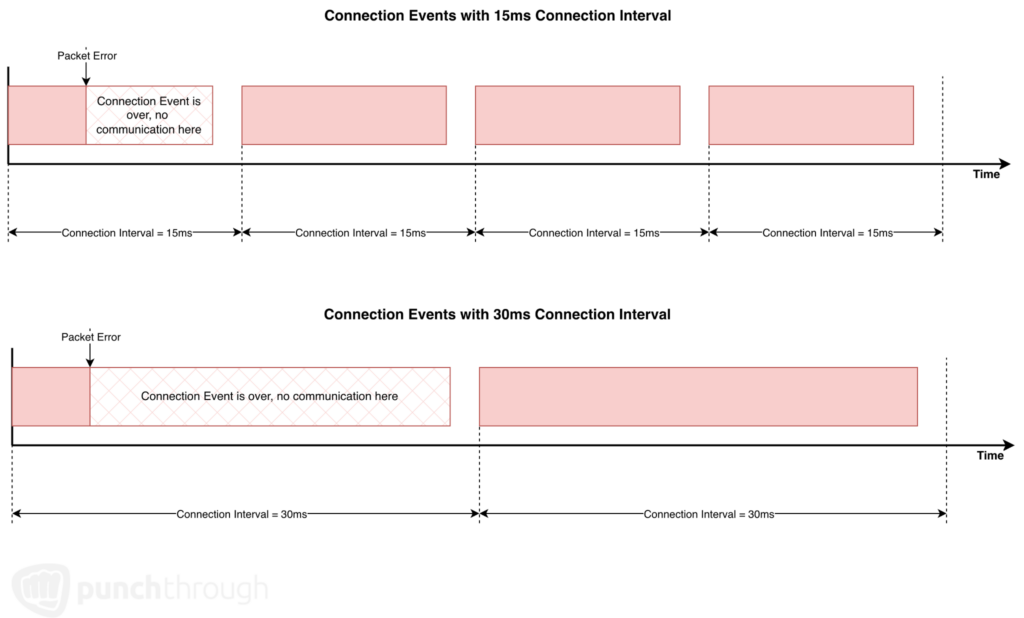
If a packet over the air is lost or corrupted, the connection event ends. If the first packet of a connection event has a packet error, a shorter Connection Interval means the next connection event (i.e. the next opportunity to send the packet) comes sooner. There is less idle time waiting for the start of the next connection event.
Consider these two connections using different Connection Intervals. If a packet error were to occur at the same point in a connection event, the shorter Connection Interval resumes transmission of data much sooner than the longer Connection Interval.
Connection Intervals with Proprietary Devices
Connection Parameter behavior depends on whether the Central and Peripheral are two proprietary devices or if one device is an off-the-shelf device like a computer or an Android/iOS mobile device. If the two devices are proprietary and they don’t need to share their 2.4GHz front-end, these devices can communicate BLE basically nonstop. The connection event length can be the same or nearly the same as the Connection Interval, resulting in no idle time between connection events. In such a scenario, the Connection Interval has minimal impact on throughput apart from handling packet errors more cleanly.
Consider this exchange using 2M PHY, no security, and maximum length packets:

After sending 10 maximum length packets, there is only 1080us remaining before the next connection event, which is not enough time for a full packet exchange. In some stacks, if a 251 byte LL payload is queued up, the stack will defer this data until the next Connection Event. Some stacks may fragment this, with part of the payload to fill the remaining Connection Event and the remainder to start the next Connection Event as follows.

If the Connection Interval becomes too low, the ratio of the unoptimized behavior at the end of the Connection Event increases. Therefore, going with a faster Connection Interval doesn’t always produce better results.
Connection Intervals with iOS and Android
However, when using a device like an Android or iOS mobile phone, the phone limits the connection event length because it needs to perform Wi-Fi or other activities as well. We’ve found that as the connection interval is increased, the connection event length may not increase at the same rate or it may even plateau.
With a single BLE connection, we’ve found that iOS commonly allocates about 50% of a 15ms Connection Interval for the Connection Event. This means throughput is effectively cut in half from a theoretical maximum.

With Android, Punch Through has historically observed more variability in the Connection Event duration, where the maximum may exceed 50% of the Connection Interval for some Connection Events.

However, as the Connection Interval increases, the allocated time ratio for a Connection Event may be reduced. Actual behavior on a platform may vary, but for demonstration purposes, here is an example where the Connection Event is limited to 33% of available airtime.

How to Modify Connection Parameters
Most embedded Bluetooth stacks provide APIs to request specific connection parameters. OSes like Android and iOS do not provide similar APIs. This means if you are designing a BLE Peripheral to connect to Android/iOS device, your Peripheral will be responsible for requesting your desired connection parameters.
Connection parameters can be changed throughout a connection. If you need a high Peripheral Latency or Connection Interval to minimize power consumption, then you may request throughput-optimized connection parameters prior to high throughput exchanges. Once completed with high throughput activities, the devices can revert back to low power-optimized connection parameters.
A Note on Multiple Connections
Before moving on, there’s one more factor worth flagging that can undermine even well-configured connection parameters.
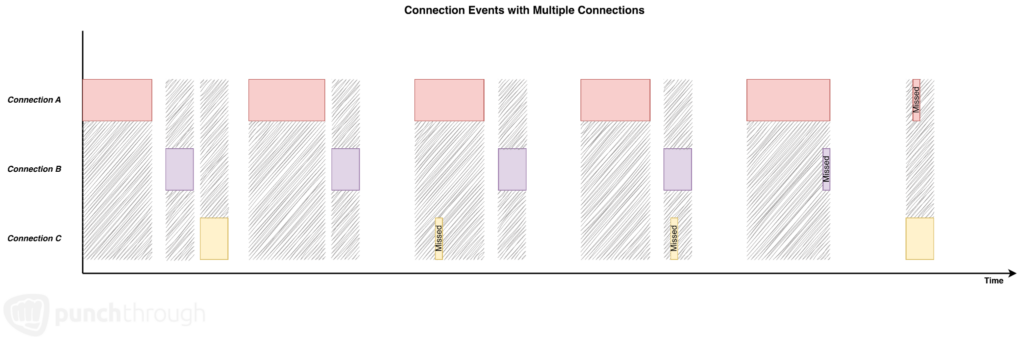
BLE connections consist of one-to-one communication between two devices. If a single Peripheral or Central has multiple connections to other devices, it needs to divide air time between devices. This leads to shortened or missed Connection Events, which leads to a reduction in time windows for exchanging data within a single connection.
The following diagram shows how multiple connections are managed from the perspective of a single Central or Peripheral. Shaded areas represent the radio being occupied by an active Connection Event. A few constraints drive the behavior shown: only one Connection Event can be handled at a time, Connection Events must start on time or they are skipped entirely, and the BLE stack may cut a Connection Event short to service one from a different connection. As a result, there is no guarantee that every Connection Event will be serviced.
Likewise, to support multiple connections, a Peripheral needs to continue advertising and a Central needs to continue scanning while already connected. These activities require air time that could otherwise be used for sending high throughput data or lead to missed Connection Events.

There is no easy way to quantify the impact of multiple connections on throughput. It depends on the number of connections, what is happening within each connection, connection intervals, alignment of the Connection Events, and variability in BLE stack behavior.
In summary, avoid supporting multiple connections if possible, and remember to disable advertising while in a connection.
A Note on Bidirectional Data
BLE can only transmit data in one direction at a time, i.e. it’s half-duplex. Therefore, to maximize throughput in a single direction, it is best to minimize sending data in the opposite direction because it occupies air time.
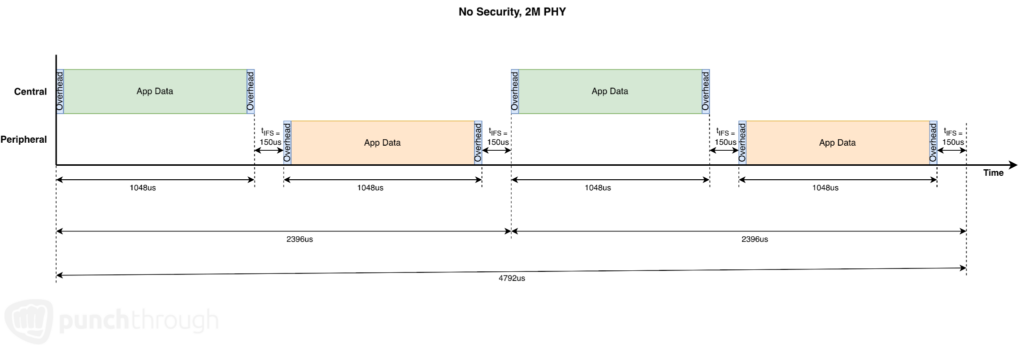
With maximum data running in both directions, we see a theoretical application data throughput of 103.3 kBytes/sec in each direction.
Where to Go From Here
With connection parameters dialed in, the stack configuration work is largely done. The last place throughput can quietly break down is at the application layer, or how you queue outgoing data, how you size your transmit pipeline, and how you keep it flowing.
Up Next: BLE Transfer Methods and Application Design for Throughput →